
CuePlayer · 행사 저장
행사 저장 · 다른 노트북으로 옮기기
updated
This guide is written in Korean. An English version is not available yet.
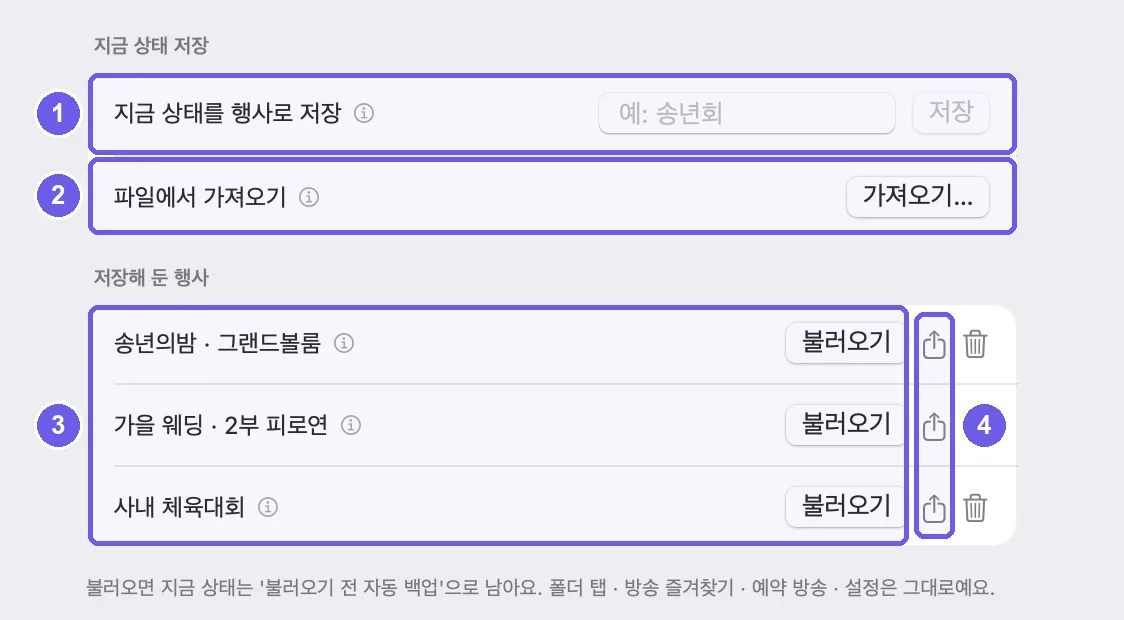
- 지금 상태를 행사로 저장: 이름을 쓰고 저장. 플레이리스트와 효과음 뱅크 · 칸(칸 편집 포함)이 한 번에 저장돼요. 같은 이름이면 덮어써요.
- 파일에서 가져오기: 다른 노트북에서 내보낸 행사 파일을 넣어요. 맥과 윈도우끼리도 돼요. 이름이 겹치면 '(가져옴)'이 붙어 원래 행사를 덮어쓰지 않아요.
- 저장해 둔 행사: 최근 순. 불러오기를 누르면 지금 플레이리스트와 효과음 뱅크 · 칸이 그 행사로 바뀌어요. 직전 상태는 '불러오기 전 자동 백업'으로 남아요.
- 내보내기: 행사를 파일 하나로 빼요.
- 재생이나 방송 중에는 소리가 끊기지 않게 불러오기를 막아 둬요.
- 폴더 탭 · 즐겨찾기 · 예약 방송 · 설정은 행사 저장에 들어가지 않아요.
- 곡 파일은 함께 옮겨지지 않아요. 새 노트북에 같은 곡을 넣어 두고, 못 찾는 곡은 위치 다시 찾기로 이어 주세요.