
CuePlayer · 시작하기
화면 한눈에 보기
updated
This guide is written in Korean. An English version is not available yet.
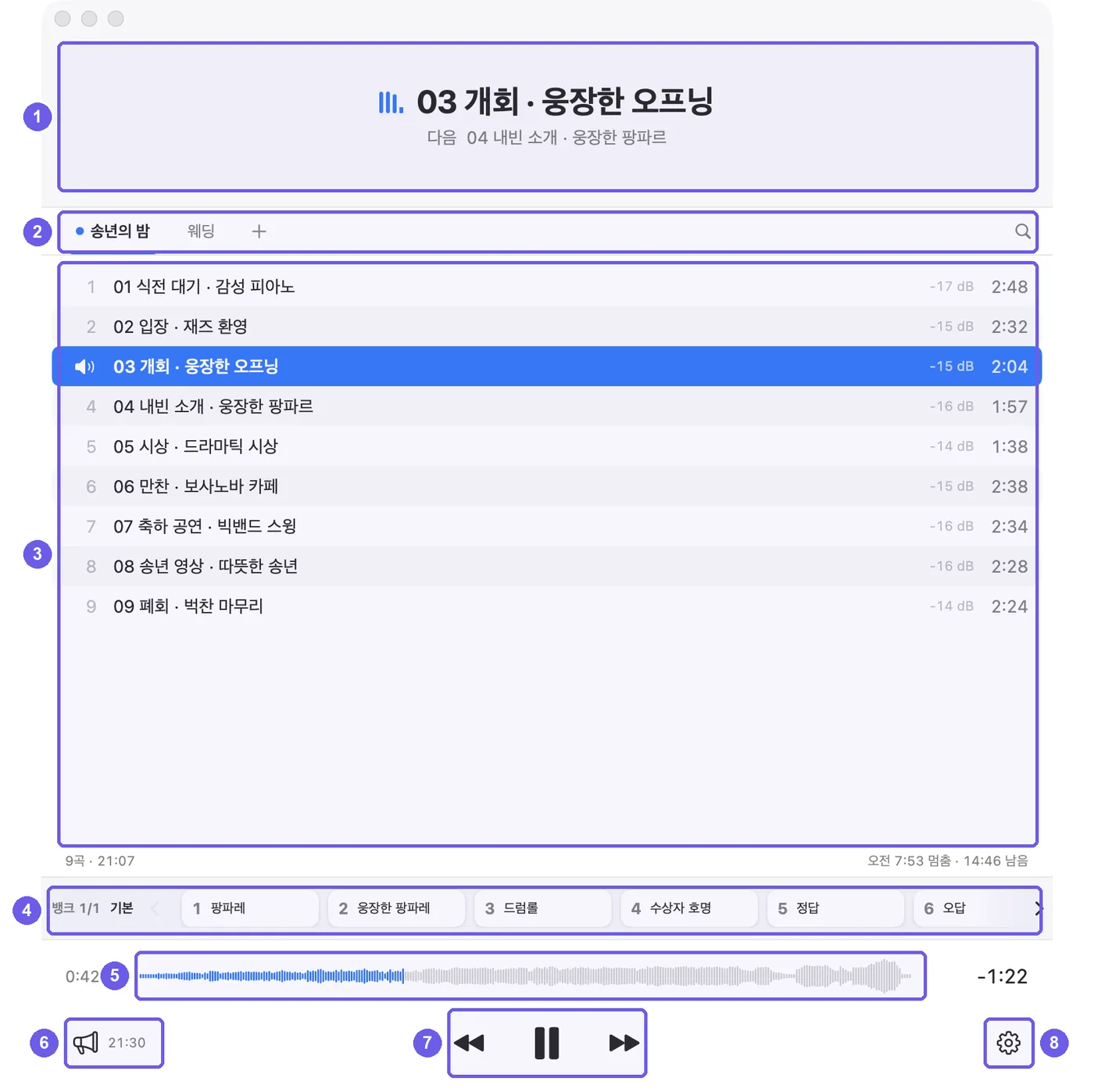
- 지금 곡 · 다음 곡. 멈추면 '이어서 0:31부터', 한 곡씩 모드에서는 곡이 끝나면 다음 곡이 여기로 올라와 처음 자리에서 대기해요.
- 플레이리스트 탭. 식순별로 나눠 두고 눌러서 오가요. 오른쪽 돋보기는 곡 검색이에요.
- 곡 목록. 지금 나오는 곡은 파란 줄이에요. 오른쪽 숫자는 곡 크기(RMS dB)와 길이예요.
- 효과음 패드. 숫자 키 1~9로 바로 나가요.
- 파형과 시간. 눌러서 원하는 자리로 옮겨요. 오른쪽은 남은 시간이에요.
- 방송. 안내 방송 창을 열어요. 옆 시각은 다음 예약 방송이에요.
- 재생 · 이전 곡 · 다음 곡.
- 설정. 새 버전이 나오면 여기에 표시가 떠요.